


Preparing for business school means many things: connecting with future classmates; figuring out coursework; and brushing up on your writing and quant skills. It also means ensuring that you begin your program with the equipment you need to succeed—in particular, your laptop.
Choosing the right device is a crucial part of ensuring readiness for the strenuous MBA curriculum. To help you do so, we’ve rounded up recommendations from leading MBA programs and highlighted a few options for you to consider.
The Hardware: What do Business Schools Recommend?
To be the perfect fit for business school, there are specific things that your laptop needs to have or do. Many schools provide guidance on these specifications, sharing lists of the minimum and recommended hardware requirements for student laptops.
Guidance from Business Schools
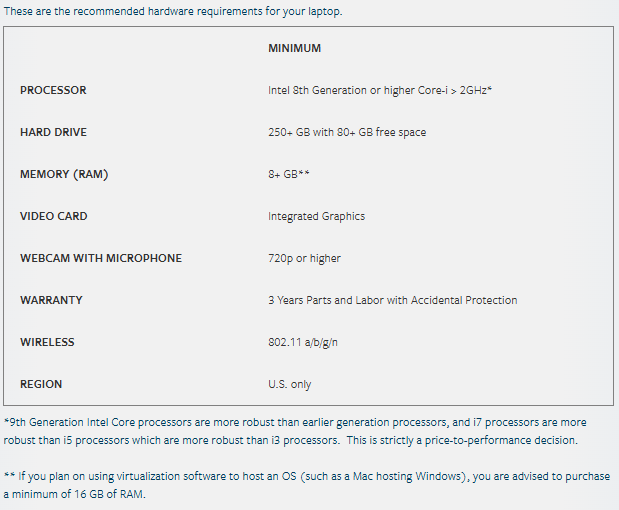
UCLA Anderson School of Management is one such school that offers prospective MBAs a guide to suitable laptops for the program. UCLA’s laptop recommendations are detailed below:
Similarly, MIT Sloan School of Management has the Information Systems & Technology (IS&T), which provides guidance on which laptops to buy. It’s worth noting that the recommendations that IS&T provides are fairly general, aiming to assist all incoming MIT students regardless of program of study. Details more specific to the Sloan MBA program can be found in their computer info sheet.
You’ll find that most major laptop companies—such as Lenovo and Apple—have all or most of the suggested specifications included in newer models.
The Software: Windows versus Mac?
Some business schools specify which operating system students should favor. For example, Columbia Business School’s “Choosing a Laptop” guidelines state that certain programs are designed to run on the Windows operating system—not the macOS. For those purchasing a new laptop for the program, the school recommends avoiding Apple altogether, explaining that:
“Some students who have chosen to purchase a Mac prior to CBS have later regretted the choice because they ended up using Windows more than anticipated, and Windows virtualized in a Mac never performs as well as if it were ran natively… Additionally, the latest models using the proprietary M-series processors (with the ARM architecture) can only run Windows using emulation software that you will have to purchase separately, and some software developers have not created a compatible version of their applications for it… For these reasons, we recommend that anyone who has to purchase a new laptop to meet the School’s minimum computing requirements selects a native Windows machine.”
For incoming CBS students already in possession of an Apple laptop, ITG will assist with—and cover the cost of—Windows setup using the VirtualBox utility. To access this support, students must own at least macOS Monterey (version 12) and have 75GB of free space on their hard drive.
UCLA Anderson, on the other hand, is open to both Windows and Mac operating systems. The school recommends that students use either the Windows 11 Pro, Education 64-bit, or macOS 14 Sonoma (Windows 10 or the macOS 12 Monterey are listed as the minimum level).
Before beginning laptop research, be sure to read your business school’s software requirements guide.
Affordable Options
For many MBA prospects, affordability is a high priority when selecting a laptop. It is most certainly possible to secure a great laptop for under $500 —one that is capable of delivering impressive performance and comes with the necessary features to aid in business school tasks and projects.
Three such laptops include:
- Acer Aspire 3 (A315-24P): Strong performance and plenty of storage.
- HP Laptop 14-ep0865no: Complete with a long battery life.
- Lenovo IdeaPad 1i 14 Laptop: Portable and lightweight.
Sparing No Expense: Investing in the Best Laptop for your MBA
Your laptop likely isn’t going to just be for your business school needs. As a way to stay connected to family and friends, your machine will also likely aid in personal projects and even be your passport to entertainment.
If within your budgetary limits, you might want to consider investing in a device that not only fits the hardware requirements for your MBA, but lasts for many years to come.
Three laptops that fit this higher-cost, high-quality profile are as follows.
- Apple Macbook Pro 16-Inch (2025): Offering extensive battery life and nano-texture display.
- Dell XPS 15 (2025): Known for powerful performance and a sleek display.
- Lenovo ThinkPad X1 Carbon Gen 11:Praised for its “durability, performance, comfortable keyboard, and sleek design.”
Looking for Business School Laptop Deals
If you’ve done your research and know exactly what model you want, purchasing directly from a company like Lenovo, Apple, Dell or Microsoft can offer greatest ease. With experts at your side, in addition to having the option to try out devices hands-on, it can be the quickest way to make your decision and save you time from digging through endless online listings.
If you do, however, have that time to spare, online listings can be a great way to locate the best deals. Amazon, for example, is known for providing a one-stop shop for everything we need; it’s no surprise this multinational tech company takes first place for laptops as well. Amazon has a helpful laptop-buying guide that allows you to search for laptops based on your lifestyle or the specs you want (SSD, battery life, display size, etc.). If you want to find all laptops available with a particular set of features, this is one of the best tools online. At the same time, Amazon sells a vast variety of laptops from manufacturers around the world.
Major online distribution outlet, Newegg, also offers its own laptop buying guide. The guide breaks down your options by interesting categories and offers sales, discounts, and features that make finding deals even easier. For instance, there is a convenient option to activate a product for price alert, enabling you to watch for future deals.
When to Look for Deals
It’s important to keep in mind that there are certain times of the year when laptop deals might be most common. According to Digital Trends, students should keep an eye out for discounts in the back-to-school season, as well as on Black Friday and Cyber Monday.
Plus, some schools—like MIT Sloan—work with a variety of vendors to provide discounted pricing on laptops (and related products) for all students and faculty. It’s definitely worth checking to see if your business school has partnerships with any technical provider and is offering discounts.